On this pageOverview
Would bid teams choose the company’s AI over Copilot?
I led design and strategy on an internal AI tool for rail bids, and reshaped it around how a bid is written.
- Role
- Design Lead and Product Strategist
- Team
- One junior UX designer, product management and engineering
- Timeline
- Dec 2025 to Apr 2026
- Stage
- Wireframes and prototypes. No final interface design yet.
- Methods
- Interviews
- Moderated usability testing
- Jobs to be done
- Tool comparison
- Prompt design
- Problem
- Bid teams already had Copilot and ChatGPT. The company’s own tool was a prompt box, and nobody had checked whether it made any real task shorter.
- What I did
- I changed a booked usability study so it compared the tool with what people already used, job by job. Then I designed the workflow, the editing model and the prompts around what I saw.
- Result
The tool won two of five jobs.
About 80% of my recommendations were marked as high priority.
I left before release, so adoption was not measured.
The business problem
Bids took so long that teams sometimes missed the deadline.
A bid is the set of documents a company submits to win a contract. Each one took so long that teams sometimes missed the deadline, and a missed deadline is lost money. The business wanted its own AI tool so teams could prepare bids faster and go for more of them.
The tool drafted bid content and created diagrams. Requirements extraction was planned.
Teams already worked in Microsoft Office with Copilot built in, and its models keep improving. A tool that only offered a prompt box, like ChatGPT, could not compete with that.
The question
The study was booked to test the interface. I changed what it asked.
I joined with usability testing already scheduled. People might manage the interface and still gain very little from it. So I kept the tasks and added the question that decides adoption.
The study as booked
Can people complete the task in this version, and where do they get stuck?
The question I added
Would they choose this over the tool they use today?
How I set the sessions up, and why
- Being involved in a bid did not mean doing the same work, so I grouped people by the result they needed and judged the tool job by job.
- A new tool has to beat a familiar one, so for each job I asked whether it was faster, the same or slower than Copilot, ChatGPT, Visio, Word or Excel.
- AI output is often almost right, so I asked people to fix a result with one thing wrong and watched whether their earlier changes survived.
- Trust shows when work leaves your desk, so I asked whether they would show the output to a manager or a client.
- Sessions
- 4, moderated
- Participants
- 3 internal specialists
- When
- February 2026
- Measures
- 7, the same in every session
- Compared with
- Copilot
- ChatGPT
- Visio
- Word
- Excel
Four moderated sessions with three internal specialists, February 2026. Every session recorded the same seven measures, including time to first value, trust and whether they would use the tool next week. The sample was small because users in a large global organisation were hard to reach, and timings were approximate.
What testing showed
Useful for thinking. Not trusted for the final document.
The tool won two of five jobs against what people already used. People valued it for understanding complex inputs and getting to a structure quickly. They would not use its output as finished work. One participant described the bid feature as scaffolding to rewrite.
Scaffolding to rewriteOne participant’s description of the bid feature
Won 2 jobs
Lost 2 jobs
Not built yet 1 job
What people already valued
People could build on an idea without starting again. They refined ideas inside the tool, took one idea and generated more from it, and built document sections from there. They said these improvements alone would make them choose it.
Their biggest concern
The final document still had to be made by hand. A bid is submitted in a strict, official format, down to details such as font size. The tool gave people content, and they still had to rebuild it in that format themselves.
Why it lost
People needed different help within the same bid
One specialist needed to find relevant requirements in long documents and was given a drafting feature. Being involved in a bid had been enough to include them in testing, but that feature did not address their task.
People could not see what an answer was based on
One participant asked whether the tool knew which document it was working from. Another could not tell whether it was still thinking or had finished. Bid text was sometimes off target, so people treated it as a first draft.
Fixing an answer could lose the work
Regenerating replaced the previous result, with no way to compare versions or go back. Export was hard to find, and the diagrams were not polished enough to share with clients.
Writing the prompt was the first barrier
Some people had barely used AI. The tool needed very specific prompts, and it was unclear how large a task to ask for in one go.
In one session, a participant rated process diagrams they could edit 4 out of 5, and Gantt charts they could not edit 2.5 out of 5. Whether people could change the output mattered more than the quality of the first answer.
What I changed
The tool had to follow how a bid is written.
After the infrastructure phase, the programme moved to growth and adoption, and that was my part of the work. People would choose the tool if it made their work simpler and shorter. So I started from their journey: where AI could take over and give a fast first result, and where a person works on each part.
Set up
Person
Uploads the bid documents and sets the context, such as win themes.
Ask
Person
Says what to write about and picks the source.
People did not know what to type.
Ideas
AI
Proposes ideas, each labelled with its source.
Shape
Person
Picks ideas, orders them and edits the wording.
Paragraphs
AI
Writes a paragraph for each idea.
Edit
Person
Edits the text, with AI suggestions alongside.
Regenerating replaced earlier edits.
Format
Person
Rebuilds it in Word in the format the bid requires.
Stayed manual. People’s biggest concern.

Keep people’s work when AI changes it
Regenerating replaced the previous result. People could not compare versions or go back, and they were unsure whether to edit or prompt again.
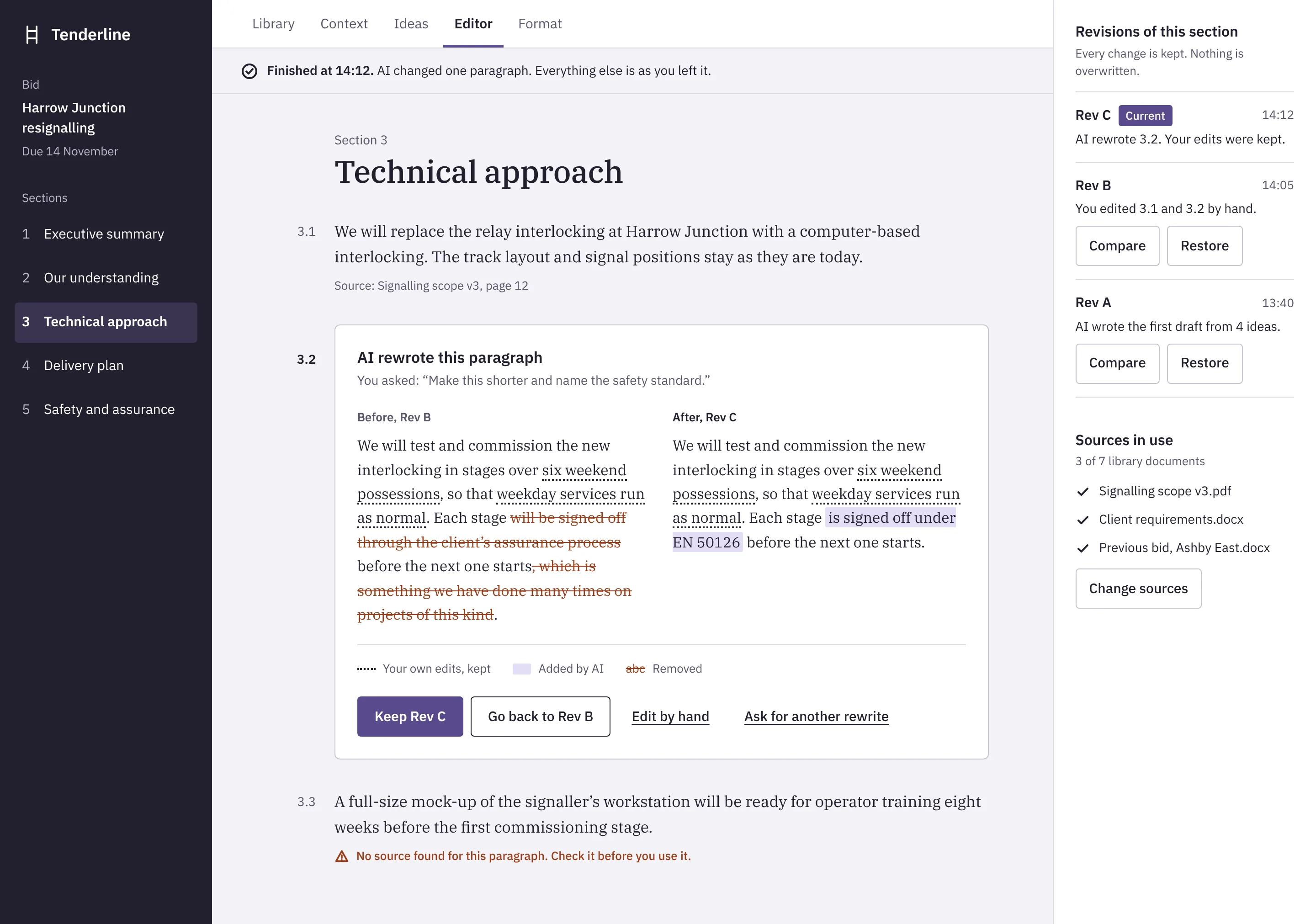
I designed the editing model at wireframe level. People edit inside the document, every revision is kept, and they can compare two revisions or restore one. I put this at the top of the priorities, with guidance on when to edit and when to regenerate.
Finished at 14:12. AI changed one paragraph. Everything else is as you left it.
Section 3
Technical approach
We will replace the relay interlocking at Harrow Junction with a computer-based interlocking. The track layout and signal positions stay as they are today.
Source: Signalling scope v3, page 12
We will test and commission the new interlocking in stages over six weekend possessions, so that weekday services run as normal. Each stage is signed off under EN 50126 before the next one starts.
Revisions of this section
Every change is kept. Nothing is overwritten.
The other changes
Promise the right job
Outputs were not polished enough to share outside the team, and final bid writing was not trusted.
I repositioned the tool as a co-pilot for understanding, structuring and early drafting. I also said plainly what it should not be presented as yet: a one-click generator of finished documents.
Take the prompt off the user
Beginners did not know what to ask, and the tool needed precise wording.
I designed the prompts behind bid drafting, requirements extraction and diagrams. We added tips that appear as people type, written and video instructions, and a training workshop.
Show what an answer is based on
People asked which document the tool was using.
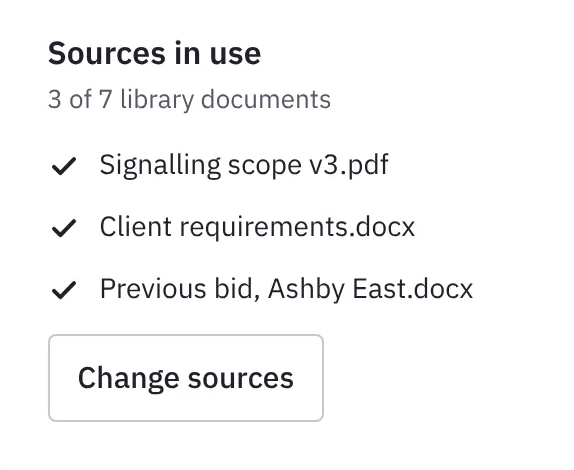
Each idea carries a label for where it came from, and people choose the source before they ask. Testing showed a gap: they could not see which library documents were active. The design for requirements extraction handled this better, with each requirement beside its source passage. I did not get to test that design.


Produce the submission format
Formatting stayed manual, and it was people’s biggest concern.
I proposed output in the format a bid has to be submitted in, and easier export to Word and PDF, so teams stop rebuilding the document by hand.
The system behind it
What sits behind the prompt box.
The tool was designed as an agentic system. A request is routed to a specialised agent for the job, and each agent works from the company’s own documents. Every result comes back to a person to review. The interface had to show which job was running, which documents it used and where a person needed to review the result.
How the parts connect
The three agents are separate, and the request decides which one runs. Extraction returns a requirements list. Compliance returns an assessment against product requirements. Drafting returns draft sections for a person to edit. Each result comes back to a person for review, and approved requirements and assessments are saved.
The requirements specified checks on each request on the way in and on each answer on the way out. On the way in: attempts to manipulate the model and requests that are off topic. On the way out: facts, rail terminology, legal and regulatory requirements and harmful content. What a person sees when a check fails was not defined in the requirements I worked from.
What this meant for my design
| What I learned about the system | What I designed |
|---|---|
| Each agent reads a different source, and people asked which document the tool was using. | Each idea carries a label for its source, and people choose the source before they ask. In the requirements extraction design, each requirement sits beside its source passage. |
| Every result returns to a person. | A seven-step journey that says where AI drafts and where a person decides. A person reviews every draft. |
| AI can rewrite its own output, and regenerating replaced people’s work. | Editing inside the document, with every revision kept and a way to compare and restore. |
| Three agents serve three kinds of work. | I mapped three user groups and what each one needs: bid writers, specialists and engineers. |
One tool, three kinds of work
In a large bid, many people work on the same documents for different reasons. I mapped who needed what, so each feature could be built and tested for the right person.
| Who | Their job in a bid | What fits today | What is missing |
|---|---|---|---|
| Bid writers | Structure and draft the response. | Outlines, ideas and first drafts of sections. | The submission format, and the style of previous bids. |
| Specialists | Find the requirements that concern them in long documents. | Diagrams for explaining a process. | Requirements extraction by keyword. |
| Engineers | Explain a process and produce drawings. | Process diagrams. | Technical drawings, and export they can keep editing. |
Outcome
About 80% of my recommendations were marked as high priority.
I raised the adoption problem with the team: as it stood, bid teams would not choose this tool over ChatGPT or Copilot. I showed where it lost, and what had to be fixed for the MVP to reach its target for cutting bid preparation time. The roadmap changed, and the product got a clearer job.
The work then moved into a larger plan to merge two internal AI tools into one workspace, where I worked on adoption and trust.
What I put first, and why
Building everything at once was too expensive, so I put the changes in order, step by step.
Editing inside the document, with every revision kept
I put this first and marked it as essential. Regenerating had replaced people’s work, and whether they could change the output mattered more to them than the quality of the first answer. This included the diagrams, which could not be changed at all.
Output in the submission format
Most of people’s time went on rebuilding the document in Word to match the required format. I proposed output in that format, with easier export to Word and PDF.
Prompts written for the user
People new to AI did not know what to type. I designed the prompts behind bid drafting, requirements extraction and diagrams, with tips as people type, video guidance and training.
One step at a time
I used progressive disclosure in the workflow, so each screen shows only what the current step needs. Testing showed people needed this.
The right feature for each role
Requirements extraction for specialists, then a retest with them. A diagram-type chooser with examples. Three user groups: bid writers, specialists and engineers.
The research blueprint
Colleagues across countries would be running more sessions, including people without a research background. I wrote a seven-stage blueprint, from defining the study to reviewing it. Its first rule is to recruit by the work people do. It makes trust and “would you choose this over your current tool?” standard measures.
What I don’t know
I left in April while the merge was in progress. I had tested bid drafting and diagram creation with users. Requirements extraction was designed and not yet tested. I don’t know what shipped, and adoption was not measured.
What I took from this
I needed to challenge the original assumptions and work within the limits of an existing build. Understanding the full task helped me find smaller changes worth pursuing, even when I could not redesign the whole experience.
Organisation, product and participant details are withheld. In the same organisation I also spent two weeks as Product Owner, shaping an AI chatbot for sales training.
Next case study EV fleet charging